005. peak hell

关卡地址#

解决方案:#

思路:#

图片下有句提示信息:

pronounce it

查看源代码得到如下提示:

peak hell sounds familiar ?

听着一点也不熟悉好吧😂!无奈找了其他攻略,原来说的是python的pickle库,一个数据持久化库。

既然是要使用pickle库,肯定还需要额外的文件。查看源代码,在peakhell标签找到了一个banner.p文件。

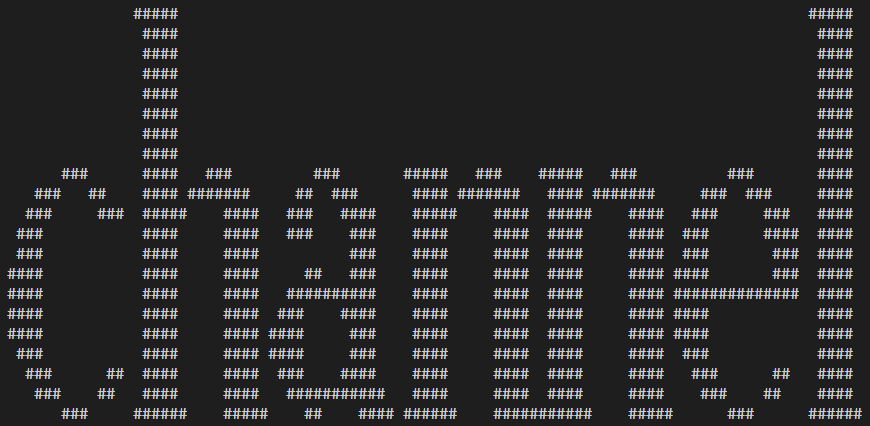
使用pickle反序列化后,得到的是一个二维列表,元素是一个元组,表示(char,number)

最终得到的字符画如下:

channel

PS: 如果看不出字符画是什么,请增加窗口显示宽度试试。

代码:#

banner="http://www.pythonchallenge.com/pc/def/banner.p"

dir="../../Data/005"
import helper
helper.ensureDir(dir)

import urllib.request
(filename,headers)=urllib.request.urlretrieve(banner,dir+'/banner.p')

import pickle
data=pickle.Unpickler(open(filename,'rb')).load()

# print(data)

for line in data:
    for tupleitem in line:
        print(tupleitem[0]*tupleitem[1],end='')
    print('')

# ================================
# without pickle
fp=open(filename,'r')
lines=fp.readlines()
fp.close()

import re
reln=re.compile('aa')
renum=re.compile('^I([0-9]*)')
rechsharp=re.compile("S'#'|g6")
rechspace=re.compile("S' '|g2")

for line in lines:
    if reln.search(line) != None:
        print('\n',end='')
        continue
    if rechsharp.search(line) != None:
        ch='#'
        continue
    if rechspace.search(line) != None:
        ch=' '
        continue
    if renum.search(line) != None:
        num=renum.search(line).group(1)
        print(ch*int(num),end='')
        continue
# ================================
$banner="http://www.pythonchallenge.com/pc/def/banner.p"

$path="../../Data/005"

. .\helper.ps1
New-Dir -Dir $path
$path=$(Resolve-Path $path).Path

$filename=$path+"/banner.p"
Invoke-WebRequest -Uri $banner -OutFile $filename

$lines=Get-Content $filename

$reln=[regex]'aa'
$renum=[regex]'^I([0-9]*)'
$rechsharp=[regex]"S'#'|g6"
$rechspace=[regex]"S' '|g2"

foreach ($line in $lines) {
    if ($reln.IsMatch($line)) {
        [System.Console]::WriteLine()
        continue
    }
    if ($rechsharp.IsMatch($line)) {
        $ch='#'
        continue
    }
    if ($rechspace.IsMatch($line)) {
        $ch=' '
        continue
    }
    if ($renum.IsMatch($line)) {
        $num=[int]$renum.Match($line).Groups[1].Value
        [System.Console]::Write($ch*$num)
        continue
    }
}
package main

import (
	"fmt"
	"strings"
	"regexp"
	"strconv"
)

func (c *Challenge) Challenge005()  {
	banner:="http://www.pythonchallenge.com/pc/def/banner.p"
	
	path:="../../Data/005"
	EnsureDir(path)

	filename:=path+"/banner.p"
	Download(banner,filename)

	content:=ReadFile(filename)
	lines:=strings.Split(content,"\n")

	reln:=regexp.MustCompile("aa")
	renum:=regexp.MustCompile("^I([0-9]*)")
	rechsharp:=regexp.MustCompile("S'#'|g6")
	rechspace:=regexp.MustCompile("S' '|g2")

	ch:=" "

	for index := 0; index < len(lines); index++ {
		if reln.MatchString(lines[index]) {
			fmt.Printf("\n")
			continue
		}
		if rechsharp.MatchString(lines[index]) {
			ch="#"
			continue
		}
		if rechspace.MatchString(lines[index]) {
			ch=" "
			continue
		}
		matches:=renum.FindStringSubmatch(lines[index])
		if matches != nil {
			num,err:=strconv.Atoi(matches[1])
			if err == nil {
				for i:=0; i<num; i++ {
					fmt.Printf(ch)
				}
			}
			continue
		}
	}
}
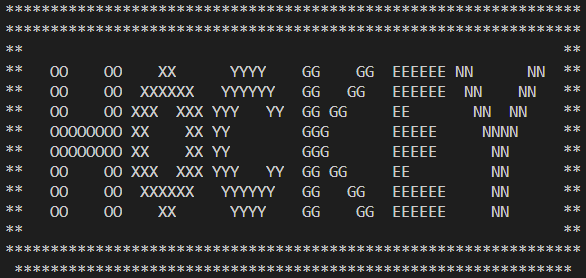

最终结果: channel#

下一关地址#

006. now there are pairs

关卡地址#

解决方案:#

思路:#

图片没有提供任何有用的信息。查看源代码得到如下信息:

<-- zip

额,更改url可以得到一个压缩文件。

打开压缩文件,找到readme.txt文件,内容如下:

welcome to my zipped list.

hint1: start from 90052
hint2: answer is inside the zip

按照提示按顺序读取文件,最后得到的内容是:

Collect the comments.

从comments中得到的信息是:

oxygen

所以下一关地址是:hockey???

错!访问这个地址你会得到如下内容:

it’s in the air. look at the letters.

好吧,原来是oxygen

代码:#

import helper
dir="../../Data/006"
helper.ensureDir(dir)

import urllib.request
channel="http://www.pythonchallenge.com/pc/def/channel.zip"
(filename, headers)=urllib.request.urlretrieve(channel, dir+"/channel.zip")

import zipfile
zip=zipfile.ZipFile(filename)

import re
pattern=re.compile("Next nothing is (/d+)")

entryname="90052"
outstr=[]
while True:
    name=entryname+".txt"
    cnt=zip.read(name).decode('utf-8')
    outstr.append(zip.getinfo(name).comment.decode('utf-8'))
    try:
        entryname=pattern.search(cnt).group(1)
    except:
        print("last: %s, cnt: %s" %(entryname, cnt))
        break

print(''.join(outstr))
$path="../../Data/006"

. .\helper.ps1
New-Dir -Dir $path

$url="http://www.pythonchallenge.com/pc/def/channel.zip"
$filename=$path+"/channel.zip"
# 转换为文件的绝对路径
$filename=$ExecutionContext.SessionState.Path.GetUnresolvedProviderPathFromPSPath($filename)
Invoke-WebRequest -Uri $url -OutFile $filename

[void][System.Reflection.Assembly]::LoadFile($PSScriptRoot+"/lib/ICSharpCode.SharpZipLib.dll")

$namespace="ICSharpCode.SharpZipLib.Zip.{0}"

$zip=New-Object($namespace -f "ZipFile")($filename)

$pattern=[regex]"Next nothing is (\d+)"
$entryname="90052"

$outstr=""
while ($true) {
    $entry=$zip.GetEntry($entryname+".txt")
    $stream=$zip.GetInputStream($entry)
    $reader=New-Object System.IO.StreamReader($stream)
    $cnt=$reader.ReadToEnd()
    $reader.Dispose()
    $stream.Dispose()

    $outstr+=$entry.Comment
    $match = $pattern.Match($cnt)
    if ($match.Success) {
        $entryname = $match.Groups[1].Value
    } else {
        "last: {0}, cnt: {1}" -f $entryname,$cnt
        break
    }
}

$zip.Close()
Write-Output $outstr
package main

import (
	"fmt"
	"archive/zip"
	"io/ioutil"
	"regexp"
)

func (c *Challenge) Challenge006() {
	path:="../../Data/006"
	EnsureDir(path)

	filename:=path+"/channel.zip"
	channel:="http://www.pythonchallenge.com/pc/def/channel.zip"
	Download(channel,filename)

	rc,err:=zip.OpenReader(filename)
	if err != nil {
		fmt.Printf("open zip failed![%v]\n", err)
	}

	defer rc.Close()

	dic:=map [string] *zip.File {}
	for _,file := range rc.File {
		dic[file.Name]=file
	}

	outstr:=""
	pattern:=regexp.MustCompile("Next nothing is (/d+)")
	name:="90052"
	for true {
		file,exists:=dic[name+".txt"]
		if exists {
			outstr+=file.Comment
			rc,err:=file.Open()
			if err == nil {
				defer rc.Close()
				bytes,err:=ioutil.ReadAll(rc)
				if err == nil {
					cnt:=string(bytes)
					matches:=pattern.FindStringSubmatch(cnt)
					if len(matches) != 2 {
						fmt.Printf("last: %s, cnt: %s\n", name, cnt)
						break
					} else {
						name=matches[1]
					}
				}
			}
		}
	}

	fmt.Println(outstr)
}

最终结果: oxygen#

下一关地址#

007. smarty

关卡地址#

解决方案:#

思路:#

这一关源代码中没有任何提示信息,看来信息都在图片中了。

smarty

图片中间位置有一条灰度图像,灰度图取值范围与ASCII码范围一致,所以可以将灰度值转换为ASCII码。小灰度条的宽度都是7px(除了第一条是5px)。需要注意灰度图与图片右边界有21px空白。

行动起来吧。

经过灰度值转换得到如下信息:

smart guy, you made it. the next level is [105, 110, 116, 101, 103, 114, 105, 116, 121]

将列表中数值转换后就是下一关的地址了。

代码:#

import helper
path="../../Data/007"
helper.ensureDir(path)

import urllib.request
img="http://www.pythonchallenge.com/pc/def/oxygen.png"
(filename, headers)=urllib.request.urlretrieve(img, path+"/oxygen.png")

# python3图像处理库Pillow(friendly PIL fork)
# 文档地址:https://pillow.readthedocs.io/en/5.3.x/
from PIL import Image
im=Image.open(filename)
(w,h)=im.size
px=im.load()

outstr=[]
# 21px是灰度图右边空白的宽度
for i in range(0,w-21,7):
    (r,g,b,a)=px[i,h/2]
    # 灰度图r,g,b三个分量值相等
    outstr.append(chr(r))
im.close()

msg=''.join(outstr)
print(msg)

import re
pattern=re.compile(r'[\d]+')

nextlevel=''.join(map(chr,map(int,pattern.findall(msg))))
print(nextlevel)
$path="../../Data/007"

. .\helper.ps1
New-Dir -Dir $path
$path=$(Resolve-Path $path).Path

$url="http://www.pythonchallenge.com/pc/def/oxygen.png"
$filename=$path+"/oxygen.png"
Invoke-WebRequest -Uri $url -OutFile $filename

[void][System.Reflection.Assembly]::LoadWithPartialName("System.Drawing")
$img=[System.Drawing.Image]::FromFile($filename)

$msg=""
for ($i=0; $i -lt $img.Width-21; $i+=7) {
    $msg+=[char]$img.GetPixel($i,$img.Height/2).R
}
$img.Dispose()

Write-Output $msg

$outstr=""
$pattern=[regex]"\d+"
$pattern.Matches($msg) | ForEach-Object {$outstr+=[char][int]$_.Value}

Write-Output $outstr
package main

import (
	"fmt"
	"regexp"
	"strconv"
	_ "image/png"
)

func (c *Challenge) Challenge007() {
	path:="../../Data/007"
	EnsureDir(path)

	filename:=path+"/oxygen.png"
	channel:="http://www.pythonchallenge.com/pc/def/oxygen.png"
	Download(channel,filename)

	im:=OpenImage(filename)

	bounds := im.Bounds()

	msg := ""
	y:=(bounds.Max.Y-bounds.Min.Y)/2
	for x:=bounds.Min.X; x<bounds.Max.X-21; x+=7 {
		r,_,_,_ := im.At(x,y).RGBA()
		msg+=string(byte(r))
	}

	fmt.Println(msg)

	pattern:=regexp.MustCompile("/d+")
	matches:=pattern.FindAllString(msg, -1)

	outstr:=""
	for _,match := range matches {
		i,err:=strconv.Atoi(match)
		if err == nil {
			outstr+=string(byte(i))
		}
	}

	fmt.Println(outstr)
}

最终结果: integrity#

下一关地址#

011. odd even

关卡地址#

解决方案:#

思路:#

这一关的提示比较干净,一切都需要从图片中提取分析。

把所有像素值提取到文本,以下为前4行前8列像素数据:

(0, 20, 0)(142, 180, 105)(0, 20, 0)(139, 177, 100)(0, 20, 0)(143, 180, 103)(0, 20, 0)(138, 175, 98)
(148, 186, 111)(0, 20, 0)(148, 186, 109)(0, 21, 0)(144, 181, 104)(0, 20, 0)(144, 181, 104)(0, 20, 0)
(0, 20, 0)(158, 195, 118)(0, 20, 0)(148, 185, 108)(0, 22, 0)(152, 189, 112)(0, 19, 0)(150, 184, 110)
(145, 182, 105)(0, 22, 0)(158, 195, 118)(0, 20, 0)(155, 189, 113)(0, 19, 0)(146, 180, 104)(0, 20, 0)

可以看出,绿色(0, x, 0)与彩色有规律的穿插着,绿色像素分布在偶数行偶数列和奇数行奇数列,彩色像素分布在偶数行奇数列和奇数行偶数列。

012. dealing evil

关卡地址#

解决方案:#

思路:#

这一关提示很隐晦,图片名称是evil1.jpg,那是不是还有evil2.jpg呢?

在浏览器输入evil2.jpg的地址,图片中的提示是:

not jpg - _.gfx

将jpg改为gfx会得到一个文件。

evil3.jpg得到的提示是:

no more evils…

如果你不死心,继续访问evil4.jpg,你会得到一个文本文件,内容如下:

Bert is evil! go back!

所以玄机都在evil2.gfx这个文件中。

直接查看其二进制文件:

  Offset: 00 01 02 03 04 05 06 07 08 09 0A 0B 0C 0D 0E 0F 	
00000000: FF 89 47 89 FF D8 50 49 50 D8 FF 4E 46 4E FF E0    ..G..XPIPX.NFN.`
00000010: 47 38 47 E0 00 0D 37 0D 00 10 0A 61 0A 10 4A 1A    G8G`..7....a..J.
00000020: 40 1A 4A 46 0A 01 0A 46 49 00 F0 00 49 46 00 00    @.JF...FI.p.IF..
00000030: 00 46 00 00 E7 00 00 01 0D 00 0D 01 01 49 00 49    .F..g........I.I
00000040: 01 01 48 00 48 01 00 44 01 44 00 B4 52 00 52 B4    ..H.H..D.D.4R.R4
00000050: 00 00 00 00 00 B4 00 01 00 B4 00 01 04 01 00 00    .....4...4......
00000060: 90 02 40 00 FF 00 00 00 FF E1 00 05 00 E1

可以看出每五个字节类似“回文”,将其每隔五个字节连起来得到的输出是:

014. walk around

关卡地址#

解决方案:#

思路:#

这一关大图下面有个小图,查看源代码后发现是10000*1的图片显示为100*100

100 × 100 pixels (Natural: 10000 × 1 pixels)

同时还有一个提示:

remember: 100*100 = (100+99+99+98) + (…

结合标题,需要将10000*1的图片重新组合为100*100的图片,排列规律如下:

—————————————100-—————————————
|————————————98——————————————|
|   |   ................. |  |
|   |   ................. |  |
|   |   ................. |  |
98  96  ................. 97 99
|   |   ................. |  |
|   |   ................. |  |
|   |   ................. |  |
|   |   ................. |  |
| ——————————97————————————|  |
————————————99————————————————

如果一行一行排列像素会得到bit这个结果,然后得到如下提示:

you took the wrong curve.

016. let me get this straight

关卡地址#

解决方案:#

思路:#

图片每一行都有一条7个像素组成的像素块,两端是1个白色像素,中间是5个粉紫色像素,色值是(255,0,255)。由于图像模式是P,使用8位映射到调色板。

经测试,连续5个粉紫色像素的值是195。

根据标题:

让我直说吧

将这些像素块排成一列,就会得到下一关地址啦。

代码:#

import helper
path="../../Data/016"
helper.ensureDir(path)

# ================================
# 使用http认证,下载文件
import urllib.request
helper.installHTTPBasicAuthOpener("huge", "file")

gif="http://www.pythonchallenge.com/pc/return/mozart.gif"
(filename, headers)=urllib.request.urlretrieve(gif, path+"/mozart.gif")
# ================================

from PIL import Image
im=Image.open(filename)
px=im.load()

newIm=Image.new(im.mode, im.size)
newPx=newIm.load()

(w,h)=im.size
for y in range(h):
    for x in range(w):
        if px[x,y] == 195:
            for xx in range(w):
                newPx[xx,y]=px[(xx+x)%w,y]
            continue

im.close()
newIm.show()
newIm.close()
$path="../../Data/016"

. .\helper.ps1
New-Dir -Dir $path
$path=$(Resolve-Path $path).Path

$gif="http://www.pythonchallenge.com/pc/return/mozart.gif"
$filename=$path+"/mozart.gif"
Get-FileWithAuth -Url $gif -Filename $filename -Username "huge" -Password "file"

[void][System.Reflection.Assembly]::LoadWithPartialName("System.Drawing")
$img=[System.Drawing.Image]::FromFile($filename)
$newImg=New-Object System.Drawing.Bitmap $img.Width,$img.Height
$color=[System.Drawing.Color]::FromArgb(255,0,255)

for ($y = 0; $y -lt $img.Height; $y++) {
    for ($x = 0; $x -lt $img.Width; $x++) {
        if ($img.GetPixel($x,$y) -eq $color) {
            for ($xx = 0; $xx -lt $img.Width; $xx++) {
                $newImg.SetPixel($xx,$y,$img.GetPixel(($xx+$x)%$img.Width,$y))
            }
            continue
        }
    }
}

$img.Dispose()

Show-Image -Title "Challenge016" -Image $newImg
$newImg.Dispose()
package main

import(
	"image"
)

func (c *Challenge) Challenge016() {
	path:="../../Data/016"
	EnsureDir(path)

	gif:="http://www.pythonchallenge.com/pc/return/mozart.gif"
	filename:=path+"/mozart.gif"
	DownloadWithBasicAuth(gif, filename, "huge", "file")

	im:=OpenImage(filename)

	newImg:=straightImage(im)

	giffile := path+"/mozart.go.gif"
	SaveImage(giffile, newImg, "gif")
	
	ShowImage(giffile)
}

func straightImage(im image.Image) *image.RGBA {
	bounds:=im.Bounds()
	newImg:=image.NewRGBA(bounds)
	for y := bounds.Min.Y; y < bounds.Max.Y; y++ {
		for x := bounds.Min.X; x < bounds.Max.X; x++ {
			r,g,b,_:=im.At(x,y).RGBA()
			if r==65535 && g==0 && b==65535 {
				for xx := bounds.Min.X; xx < bounds.Max.X; xx++ {
					newImg.Set(xx,y,im.At((xx+x)%bounds.Dx(),y))
				}
				continue
			}
		}
	}
	return newImg
}

最终结果: romance#

下一关地址#

017. eat?

关卡地址#

解决方案:#

思路:#

这一关图片中是曲奇饼干,左下角图片是不是有点熟悉?是第四关啦!

查看源代码并没有什么提示。

但是!根据cookie可以联想到什么?对!就是浏览器缓存。

通过浏览器开发者工具查看cookie后,可以得到如下提示:

you+should+have+followed+busynothing…

在第四关,我们请求的是:http://www.pythonchallenge.com/pc/def/linkedlist.php?nothing=

这里需要将nothing替换为busynothing,并且收集cookieinfo的值。

之后得到BZh91AY开头的经过url编码的字符串,是不是又有点熟悉?不熟悉的请回顾第八关

使用python在解码时会有小问题:

OSError: Invalid data stream

在解码前将+替换为%20可以解决该问题。

解码后得到提示:

is it the 26th already? call his father and inform him that “the flowers are on their way”. he’ll understand.

这句话信息量有点大,26号暗示第十五关call his father则暗示第十三关,Mozart的父亲是Leopold(注意L大写)。

给Leopold打电话之后得到:

555-VIOLIN

访问violin.html得到如下提示:

no! i mean yes! but ../stuff/violin.php.

替换url之后访问,得到的是一张Leopold的照片,及:

it’s me. what do you want?

额。。。对,and inform him that “the flowers are on their way”

018. can you tell the difference?

关卡地址#

解决方案:#

思路:#

可以很明显的看出图片左右两部分的亮度不同,但还是看一下源代码的提示:

it is more obvious that what you might think

替换url为bright会提示:

ness

访问brightness仍然是相同的图片,再次查看源代码的提示:

maybe consider deltas.gz

下载解压后发现一个delta.txt文件,打开后前4行数据如下:

89 50 4e 47 0d 0a 1a 0a 00 00 00 0d 49 48 44 52 00 00   89 50 4e 47 0d 0a 1a 0a 00 00 00 0d 49 48 44 52 00 00
02 8a 00 00 00 c8 08 02 00 00 00 e0 19 57 95 00 00 00   02 8a 00 00 00 c8 08 02 00 00 00 e0 19 57 95 00 00 00
09 70 48 59 73 00 00 0b 13 00 00 0b 13 01 00 9a 9c 18   09 70 48 59 73 00 00 0b 13 00 00 0b 13 01 00 9a 9c 18
00 00 00 07 74 49 4d 45 07 d5 05 07 0c 18 32 98 c6 a0   00 00 00 07 74 49 4d 45 07 d5 05 07 0c 18 32 98 c6 a0

可以看出这是两个文件合并在一起的,结合标题,需要比较两者不同。

❤️ 如果这篇文章对你有帮助,欢迎赞助支持我继续维护 ❤️

☕ Support me ⚡ 爱发电赞助